What is ChatGPT?
Chat GPT is like your digital conversation partner. Imagine chatting with a friend who seems to know a lot about almost everything – that’s what it’s like to interact with ChatGPT! ChatGPT is an AI tool – an AI powered chatbot that uses natural language (with natural language processing in the background) to provide answers to your questions. The ChatGPT app uses AI technology for content creation to generate human like responses.
It’s built using a type of artificial intelligence technology called a language model, which has been trained on a vast amount of text from the internet, so it can answer questions, write essays, summarise long documents, and even help create poetry or song lyrics!
While ChatGPT can be incredibly useful and fun, it doesn’t understand the text it generates, nor does it have beliefs or desires – it’s simply an advanced tool that generates responses based on patterns it learned during its training.
The AI bot is a powerful tool and can act as an AI assistant when writing content.
ChatGPT was launched on 30 Nov 2022 and by March 2023, it had more than 1 billion users!
Some ChatGPT statistics worth noting
- ChatGPT launched on 30 November 2022.
- Within 5 days, it had more than 1 million users!
- Within 2 months, it had more than 100 million users!
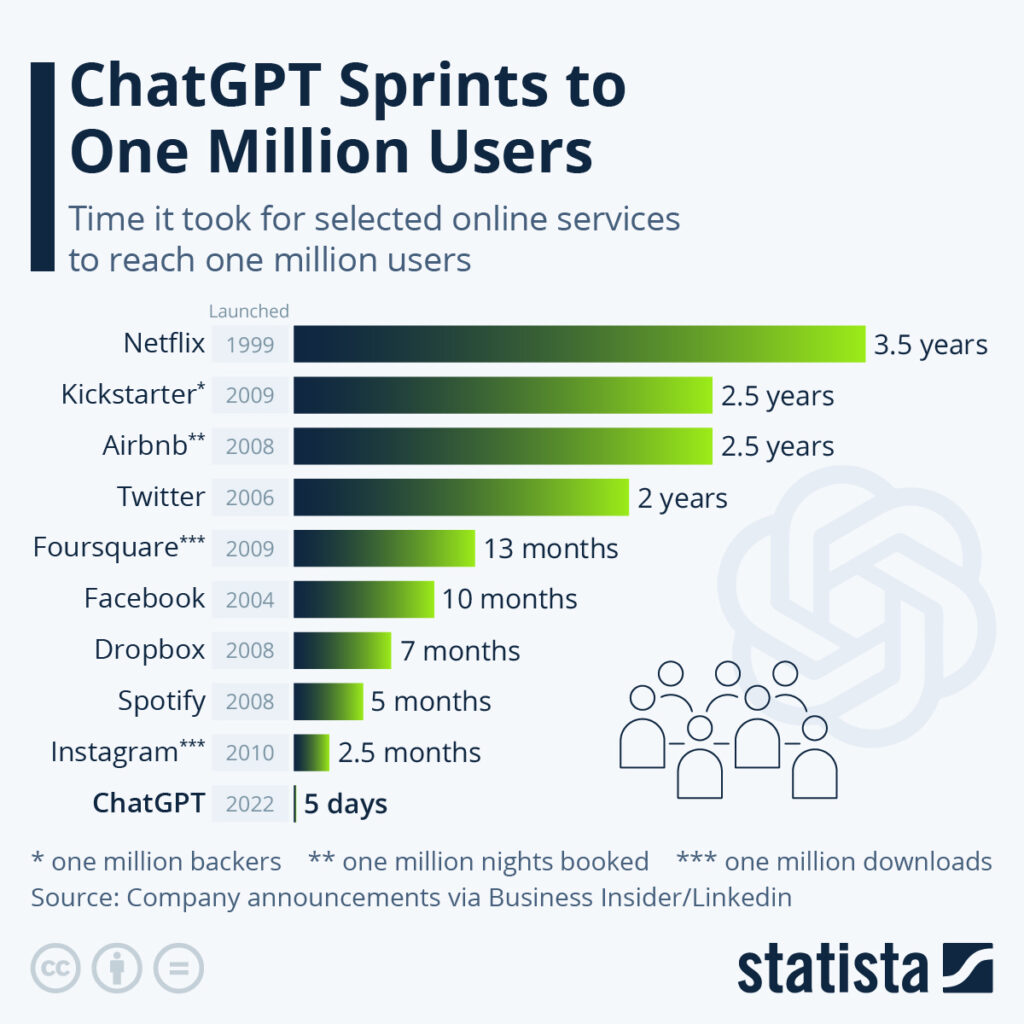
>Source: Statista
What would you use ChatGPT for?
ChatGPT can be a game-changer for any business -small or large, here’s why.
- Content Creation: ChatGPT can help generate creative ideas for blog posts, product descriptions, or social media posts and even draft your content.
- Data Analysis: If you handle a lot of written data (such as customer feedback or product reviews), ChatGPT can help summarise and analyse this information, making it easier to identify trends and make decisions.
- Productivity: By automating routine tasks like email responses or report generation, ChatGPT can free up time for your team to focus on more complex and strategic tasks.
- Training and Development: ChatGPT can create interactive training materials or simulations, providing your team with a unique and engaging learning experience.
- Customer Service: ChatGPT can be used as a virtual assistant or chatbot. This means your customers can get help whenever they need it, without waiting for business hours.
ChatGPT works best when guided by human judgement and oversight. Anything the software creates, you should still review the output to ensure it aligns with your business tone, style, and standards.
ChatGPT is a writing & brainstorming assistant that will save you lots of time.
What is Artificial Intelligence?
Imagine teaching a computer to do things that normally require human intelligence. That’s basically what AI is. It’s like giving a computer the ability to understand, learn, and make decisions. But instead of learning from human experiences as we do, AI learns from processing large amounts of data.
What different types of content can you create with AI?
- Text: AI can help you write all kinds of text, from tweets and blog posts to research reports and even poetry or stories. You give it a starting point (like a topic or a question), and it generates text based on that (ChatGPT is best for this).
- Photos: AI can’t exactly take photos, but it can create or modify new images. For example, AI can generate realistic images of people who don’t exist, turn a simple sketch into a detailed image, or even change the time of day in a photo (Midjourney is fab for this).
- Graphics: With AI, you can create unique graphics or designs. It can help you with things like logo design, creating patterns, or even generating artwork in the style of a particular artist (check out Dall E and Midjourney).
- Music: Believe it or not, AI can also help create music. You can use AI to compose a new song, generate background music, or even create a piece of music in the style of your favourite composer (check out SoundRaw.io, Suno.com).
- Apps / Code: AI can also write mobile phone apps and generate code.
Think of AI as a creative partner, helping you bring your ideas to life in new and exciting new ways.
Download the ChatGPT Blueprint
What are alternatives to ChatGPT?
There are several alternatives to ChatGPT:
- Perplexity
- Claude
- Google Gemini
- just to name a few
Some of these models require significant computational resources and technical knowledge to use effectively, while others may be more accessible for beginners or smaller projects.
How does ChatGPT work?
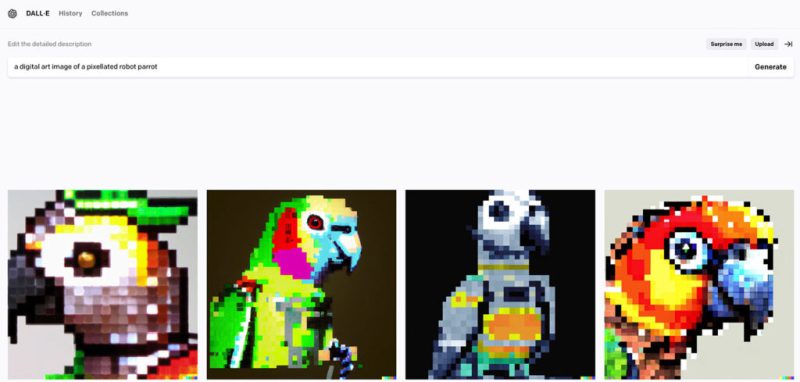
Think of ChatGPT as a really smart parrot. This parrot has read a huge number of books, websites, and all sorts of texts. Now, it can’t remember the exact things it has read, but it has learned a lot about how people use words, phrases, and sentences when communicating.
When you say something to this parrot (or give ChatGPT a prompt), it thinks about all the language patterns it has learned and tries to create a response that matches those patterns. It’s like the parrot is thinking, “Based on everything I’ve read, what is the most likely thing a human would say next?”
While ChatGPT is a smart parrot, it’s still just a parrot! And just like you’d double-check before trusting a parrot’s advice, you should also use your own judgment when using responses from ChatGPT.
What do I need to do to get good answers from ChatGPT?
You can influence the kind of responses you get from ChatGPT by structuring your prompts.
Like with anything – practice makes perfect!
Here are a few tips on how to effectively use prompts:
- Be specific: The more specific your prompt, the more likely you are to get the type of response you want. For example, instead of asking, “Write a story,” you could ask, “Write a short mystery story set in a coastal town in the 1950s.”
- Indicate your desired output format: If you want the response in a particular format, specify it in your prompt. For example, “List five reasons why…” will guide the model to provide a bullet-point list.
- Length of response: If you want a short or long response, you can ask for it. For instance, “In one sentence, explain…” or “In a detailed paragraph, describe…”. If the text it has generated is too long, you can ask it in the next prompt “Shorted this text by 50%”.
Use ChatGPT for brainstorming and as a copywriting assistant. Remove writer's block and start creating content for your customers.
What is ChatGPT capable of?
ChatGPT can handle a wide range of tasks due to its general-purpose nature. Here are some of the tasks it can perform:- Answering Questions: You can ask ChatGPT factual questions, and it will attempt to provide accurate answers based on the data it was trained on. However, verifying the information it provides is important, as it can sometimes make errors.
- Writing and Editing Content: ChatGPT can generate various content, including emails, essays, articles, and more. It can also help with editing and rewriting text.
- Creative Writing: From poetry and short stories to song lyrics and screenplay snippets, ChatGPT can help with creative writing tasks.
- Language Translation: While it’s less accurate than specialised translation tools, ChatGPT can translate text between various languages.
- Writing text in different languages: You can enter your prompts in different languages and get output in the language you started the prompt with.
- Tutoring: ChatGPT can help explain complex topics in simpler terms, making it useful for learning and education.
- Programming Help: ChatGPT can provide coding examples and help debug simple programming issues. Ideation and Brainstorming: Need ideas for a project, a product name, or a marketing campaign? ChatGPT can generate a list of suggestions.
- Conversational Partner: ChatGPT can carry on a conversation on various topics, making it useful for social chatbots.
- Role-playing and Simulation: You can use ChatGPT to simulate characters for video games or role-playing scenarios.
What are the limitations of ChatGPT?
ChatGPT is an impressive technology, but it has its limitations. Here are some key things to keep in mind:- Understanding and Context: Sometimes, it doesn’t understand the questions and provides answers that it thinks are related to the question. In these cases, you should rewrite your prompt, and make it more specific, to get better answers.
- Accuracy of Information: ChatGPT can sometimes provide incorrect or misleading information.
- Inappropriate Responses: While safeguards are in place to filter unsafe content, there may be times when ChatGPT generates responses that are inappropriate, offensive, or biased.
- Repetitive and Verbose: The model can sometimes be repetitive or overly verbose.
- Lack of Consistency: ChatGPT can lack consistency in longer conversations.
20 practical uses of ChatGPT for small business owners
- Email Drafting: Generate drafts for common emails to save time on manual typing.
- Content Creation: Generate ideas or drafts for blog posts, articles, or other written content.
- Social Media Posts: Use it to brainstorm ideas for engaging social media content.
- Product Descriptions: Generate creative and enticing descriptions for your products.
- Market Research: Analyze customer feedback or online reviews to understand market trends.
- Newsletters: Generate drafts for company newsletters.
- Meeting Summaries: Summarize key points from long meetings or conference calls.
- Brainstorming: Use it to generate ideas for new products, marketing campaigns, or business strategies.
- Educational Material: Create easy-to-understand explanations for training materials.
- Language Translation: Translate text for basic multilingual communication.
- Website Content: Generate content for your website, such as the About Us page, FAQs, etc.
- Ad Copy: Create drafts for advertising copy to promote your products or services.
- Data Analysis: Summarize and analyse written reports or data.
- Planning and Scheduling: Assist in planning business activities or scheduling appointments.
- Coding Help: Get help with basic coding problems or generate simple code examples.
- Business Proposals: Draft sections of a business proposal or plan.
- Presentation Prep: Generate talking points or slide content for a business presentation.
- Press Releases: Draft press releases announcing business updates or new product launches.
- Event Invitations: Create drafts for invitations to business events or promotional activities.
- Customer Support: Use it to power a chatbot that answers frequently asked customer questions.
How to get started with ChatGPT
If you just want to use ChatGPT for simple text generation, using a website or platform that has already integrated ChatGPT into its services is often the easiest. Alternatively, you can use ChatGPT on its website.- Find a Platform: Look for a platform or service that uses ChatGPT and suits your needs.
- Sign Up: Create an account, provide an email address and create a password.
- Understand the Cost: Some platforms offer free trials, but most will require a subscription or payment for ongoing use. Be sure to understand the cost before you start using the service.
- Learn the Interface: Spend time exploring the platform’s interface and features. There might be tutorials or guides available to help you get started.
- Start Using ChatGPT: Now you’re ready to start using ChatGPT! Generally, you can type in a prompt (such as the start of a sentence or a description of the content you want), and the platform will use ChatGPT to generate a response.
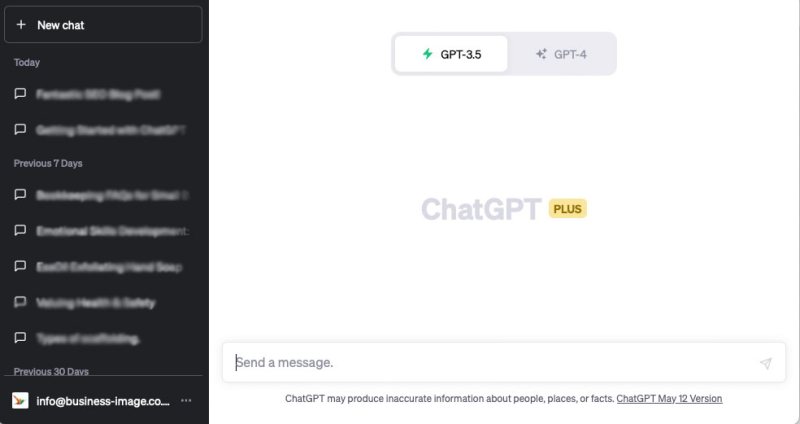
All you need to do is enter your “prompt” into text field at the bottom and click “Enter” on your keyboard.
The software will then start generating answers.